
Managing a modern sales team is more complex than simply tracking sales numbers. Sales representatives may be visiting customers, collecting orders, updating customer information, managing follow-ups, checking product availability, and reporting daily activities—all while managers need real-time visibility into what is happening across territories.
However, when these activities depend on spreadsheets, phone calls, paper-based processes, or disconnected applications, businesses can lose valuable time and important sales information.
Sales Force Automation (SFA) software helps organizations digitize and streamline these activities through a centralized technology platform.
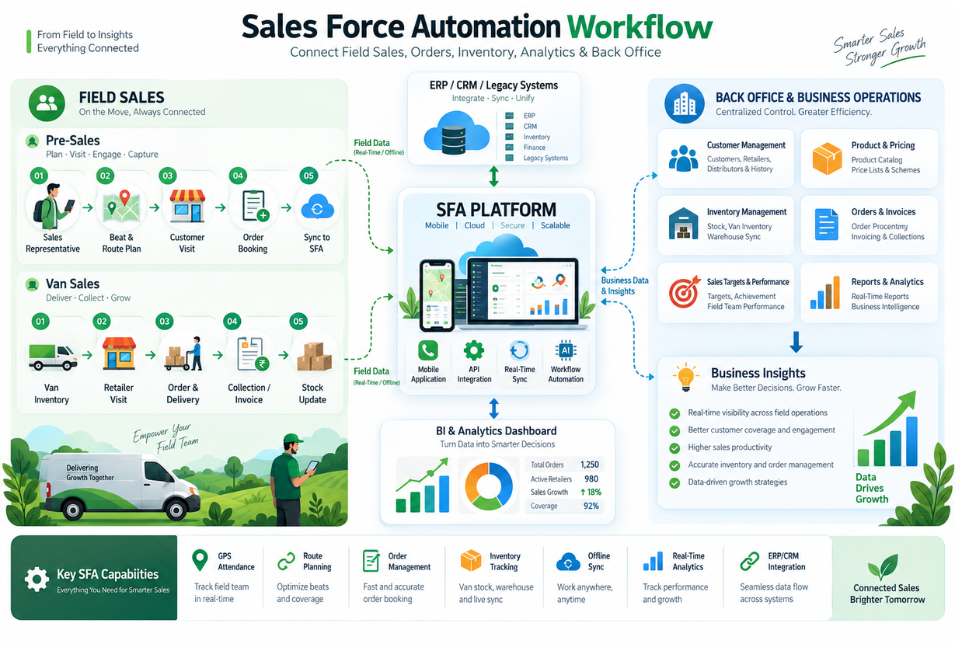
In addition, a modern Sales Force Automation System can connect field sales teams, customers, orders, products, territories, management dashboards, and business systems. When combined with Business Intelligence, AI, cloud technology, and data engineering, SFA can become a powerful platform for improving sales productivity and enabling data-driven decisions.
At Niracore, we help businesses build customized software solutions that combine sales automation, analytics, AI, integrations, and cloud technologies to support their unique business processes.
What Is Sales Force Automation?
Sales Force Automation is the use of software to automate and manage repetitive sales activities and field operations.
A typical sales team may perform activities such as:
- Planning customer visits
- Managing sales territories
- Recording customer interactions
- Creating and submitting orders
- Tracking sales targets
- Managing follow-ups
- Checking product information
- Monitoring customer activity
- Preparing sales reports
- Analyzing sales performance
When these activities are managed manually, sales teams often spend significant time on administration instead of selling.
An SFA solution brings these workflows together in one digital environment, allowing sales representatives to work more efficiently while giving managers better visibility into sales operations.
Why Businesses Need Sales Force Automation Software
As businesses grow, managing distributed sales teams becomes increasingly difficult.
A company may have dozens or hundreds of sales representatives working across different cities, territories, distributors, retailers, or customer accounts. Managers need to understand which customers were visited, what orders were generated, which territories are performing well, and where opportunities may be missed.
As a result, a Sales Force Automation platform helps centralize this information.
For example, a field representative can open the mobile application, view assigned customers, check previous orders, record a visit, create an order, schedule a follow-up, and submit the information digitally.
Furthermore, managers can access the information through dashboards and reports without waiting for manually prepared updates.
This creates a more connected sales process from field activity to management decision-making.
Key Features of a Sales Force Automation System
1. Customer Management
An SFA platform can provide a centralized view of customer information, including:
- Customer details
- Contact information
- Purchase history
- Previous visits
- Order history
- Outstanding information
- Assigned representative
- Territory details
- Follow-up activities
In addition, having customer information available in one place helps sales representatives prepare more effectively for customer interactions.
2. Field Visit Management
For organizations with field sales teams, managing customer visits is essential.
SFA software can help teams plan and track:
- Scheduled visits
- Completed visits
- Missed visits
- Visit outcomes
- Customer interactions
- Notes and remarks
- Follow-up activities
- Location information
As a result, managers can use this data to understand field activity and identify gaps between planned and completed visits.
3. Mobile Order Management
Mobile order management allows representatives to create orders directly while interacting with customers.
A typical workflow can include product selection, quantity, pricing, discounts, promotions, validation, and order submission.
Therefore, this reduces manual order entry and helps information reach the back-office team faster.
4. Territory and Route Management
Efficient territory management can help sales teams organize customer visits and reduce unnecessary travel.
Organizations can plan activities based on:
- Customer location
- Territory
- Customer priority
- Visit frequency
- Sales potential
- Representative assignment
Furthermore, mapping and location-based capabilities can improve field-sales plannin
5. Product, Pricing and Promotion Management
Sales representatives often need current product and pricing information while meeting customers.
An SFA application can provide access to:
- Product catalogs
- Pricing
- Discounts
- Promotions
- Offers
- Product availability
- Customer-specific pricing
As a result, representatives can provide accurate information and create orders efficiently.
6. Sales Target and Performance Tracking
Sales managers need more than total revenue figures.
A Sales Force Automation system can track metrics such as:
- Sales versus target
- Orders generated
- Customer visits
- New customers
- Average order value
- Territory performance
- Product performance
- Representative productivity
Therefore, these insights help management identify trends and areas requiring attention.
7. Offline Sales Operations
Field teams may work in locations where internet connectivity is inconsistent.
A custom SFA application can support selected offline activities, allowing representatives to continue working and synchronize information once connectivity becomes available.
As a result, this is particularly useful for businesses operating across large geographical areas.
Sales Analytics and Business Intelligence
Sales Force Automation becomes even more valuable when operational data is connected with Business Intelligence.
For example, organizations can use tools such as Microsoft Power BI to transform SFA data into interactive dashboards.
Typical dashboards can provide insights into:
- Sales performance
- Territory performance
- Customer trends
- Product sales
- Order activity
- Target achievement
- Representative productivity
- Regional performance
- Customer retention
Instead of relying on manually prepared spreadsheets, business leaders can work with centralized and structured sales information.
This creates a continuous cycle:
Sales Activity → Data → Analytics → Insights → Business Action
How AI Can Improve Sales Force Automation
The future of sales automation goes beyond recording activities.
AI can analyze historical and real-time sales data to identify patterns and provide useful recommendations.
For example, AI can help identify:
- Customers who may be ready to reorder
- Declining customer purchase patterns
- Potential cross-selling opportunities
- High-value customers requiring attention
- Territories with declining performance
- Products that may be relevant to specific customers
- Sales activities that require follow-up
An AI-enabled SFA system can therefore become more than a transaction platform—it can act as an intelligent sales assistant.
Integrating SFA With Existing Business Systems
Businesses rarely operate using a single application. Sales data often needs to interact with ERP, CRM, inventory, finance, and analytics systems.
A customized SFA platform can integrate with:
- ERP systems
- CRM platforms
- Inventory management
- Accounting applications
- Payment systems
- Power BI
- Data warehouses
- Cloud platforms
- Third-party APIs
A typical architecture can look like:
Mobile SFA → API Layer → Business Systems → Data Platform → BI & Analytics
This approach creates a connected flow of information across sales and business operations.
Sales Force Automation for FMCG and Distribution
FMCG and distribution organizations are among the businesses that can benefit significantly from SFA.
Sales representatives may visit multiple retailers and distributors every day. They may collect orders, check product availability, execute promotions, gather market information, and manage customer relationships.
An SFA solution can help manage:
- Retailer visits
- Distributor management
- Order collection
- Product availability
- Promotions
- Route planning
- Sales targets
- Market information
- Customer activity
- Performance reporting
By digitizing these workflows, organizations can improve visibility across their field-sales operations.
Benefits of Sales Force Automation
A well-designed SFA platform can provide several business benefits.
Improved Sales Productivity
First, automating repetitive administrative tasks allows representatives to spend more time engaging with customers.
Better Management Visibility
In addition, managers can monitor sales activity, customer visits, orders, territories, and KPIs from centralized dashboards.
Faster Order Processing
Furthermore, digital order capture reduces manual processes and improves information flow between sales and operations.
Better Data Accuracy
As a result, standardized workflows and validation rules can reduce common data-entry errors.
Improved Customer Experience
Moreover, sales representatives can access customer history, products, pricing, and previous orders during customer interactions.
Data-Driven Decision Making
Finally, integrated analytics can help management understand sales trends and make decisions using reliable business information.
Why Choose Niracore for Sales Force Automation?
At Niracore, we approach Sales Force Automation as a business solution rather than simply an application development project.
Our capabilities across custom software development, AI, Business Intelligence, data engineering, cloud technologies, and application integration allow us to build SFA solutions around specific business requirements.
Depending on the organization’s needs, we can help develop:
- Custom SFA applications
- Mobile sales applications
- Web-based management portals
- Customer and order management
- Territory and route management
- ERP and CRM integrations
- API-based integrations
- Power BI sales dashboards
- Data engineering pipelines
- AI-powered sales recommendations
- Predictive analytics
- Cloud-based solutions
- Automated reporting
The objective is to create a scalable platform that supports the complete sales lifecycle—from field activity and order capture to analytics and business intelligence.
Build a Smarter Sales Operation With Niracore
Sales Force Automation is no longer limited to tracking sales representatives or recording orders.
Modern SFA platforms can connect people, processes, data, applications, analytics, and AI into a single digital ecosystem.
Whether you are an FMCG organization, distributor, manufacturer, retailer, healthcare company, or B2B enterprise, a customized Sales Force Automation System can help digitize field operations and provide better visibility into your sales performance.
The combination of SFA + Business Intelligence + AI + Cloud + Data Engineering can take sales automation to the next level.
At Niracore, we help businesses transform their sales processes into scalable, connected, and data-driven digital solutions.
Looking to automate your sales operations or modernize your existing SFA platform? Connect with Niracore to discuss your business requirements and explore a customized Sales Force Automation solution.
FAQs
Sales Force Automation software helps businesses automate and manage sales activities such as customer visits, order processing, field operations, sales tracking, reporting, and performance monitoring.
Yes. A custom SFA application can support offline workflows, allowing field representatives to continue selected activities without an active internet connection and synchronize data later.
Yes. SFA platforms can integrate with ERP, CRM, inventory, finance, and other business applications using APIs and appropriate integration technologies.
Yes. SFA data can be connected with Power BI to create dashboards for sales, territory, customer, product, target, and representative performance.
Yes. AI can support customer recommendations, sales forecasting, cross-selling, reorder prediction, lead prioritization, and other intelligent sales workflows.
Yes. An SFA solution can be designed according to the organization’s size, sales process, number of users, integrations, and budget. A modular approach also allows businesses to expand the platform as they grow.