
Every Business generates data. Sales transactions, customer interactions, marketing
campaigns, financial records, inventory movements, and operational activities all produce
valuable information. But collecting data is only the first step. The real challenge is
transforming that information into insights that help businesses make better decisions.
Imagine a retail company managing dozens of stores. Its sales data is stored in one
system, inventory information in another, and financial reports in spreadsheets. Managers
may spend hours combining these sources just to understand which stores are performing
well and where revenue is declining.
This is where enterprise dashboard tools and AI-powered data visualization
platforms make a difference.
These solutions bring data together, transform complex information into interactive visual reports, and help teams monitor business performance through meaningful KPIs. With AI
capabilities, businesses can also explore trends, identify unusual patterns, and ask
questions about their data using natural language.
In this guide, we explore 10 enterprise dashboard and AI data visualization tools, their key
capabilities, ideal use cases, and the factors businesses should consider before choosing
a platform.
What Are Enterprise Dashboard and AI Data Visualization Tools?
Enterprise dashboard tools are business intelligence platforms that collect, organize,
analyze, and present business information through interactive dashboards and reports.
They enable organizations to monitor key performance indicators (KPIs), compare
historical performance, track operational metrics, and share insights across departments.
AI data visualization tools extend these capabilities by incorporating artificial intelligence
and machine learning into the analytics process.
Depending on the platform, AI features may include:
- Natural language queries: Ask questions about business data using everyday
language - Automated insights: Identify trends, correlations, and unusual changes in datasets.
- Predictive analytics: Explore forecasts based on historical patterns and statistical
models. - Automated report creation: Generate charts, summaries, or visualizations with AI
assistance. - Conversational analytics: Interact with business data through AI assistants.
Together, these capabilities help organizations move beyond static reports toward more
interactive, accessible, and insight-driven analytics.
Why Businesses Need Enterprise Dashboard Tools in 2026
As organizations expand, business data becomes increasingly distributed across
applications, departments, and cloud platforms. Without a centralized reporting strategy,
teams may struggle with inconsistent metrics, delayed reporting, and limited visibility.
Enterprise dashboard solutions address these challenges in several ways.
1. Centralized Business Performance Monitoring
A unified dashboard brings essential business metrics into one place. Executives can
monitor revenue, profitability, customer acquisition, operational efficiency, and other KPIs
without switching between multiple systems.
2. Faster and More Informed Decisions
Interactive dashboards make it easier to identify changes in performance and investigate
the factors behind them. Instead of waiting for manually prepared reports, decision-makers
can explore relevant information when needed.
3. Reduced Manual Reporting Effort
Automated data refreshes, reusable reporting models, and scheduled report distribution
can reduce repetitive reporting work and allow analysts to focus on deeper business
analysis
4. Improved Collaboration Across Departments
When departments use consistent metric definitions and shared dashboards, discussions
become more focused. Sales, finance, marketing, and operations teams can work from a
common view of business performance.
5. AI-Assisted Data Exploration
AI features can help users explore datasets, identify potential anomalies, and summarize
information. These capabilities can make analytics more accessible to employees who do
not have advanced technical skills.
However, AI-generated insights should always be reviewed against reliable data and
business context before decisions are made.
Recent insights indicate that a large percentage of organizations in France are adopting BI tools like Power BI, highlighting strong market demand and growth potential.
Top 10 Enterprise Dashboard and AI Data Visualization Tools
Choosing a dashboard platform depends on your organization’s data environment,
analytics requirements, technical resources, security needs, and budget.
Here are 10 platforms worth evaluating for different enterprise analytics use cases.
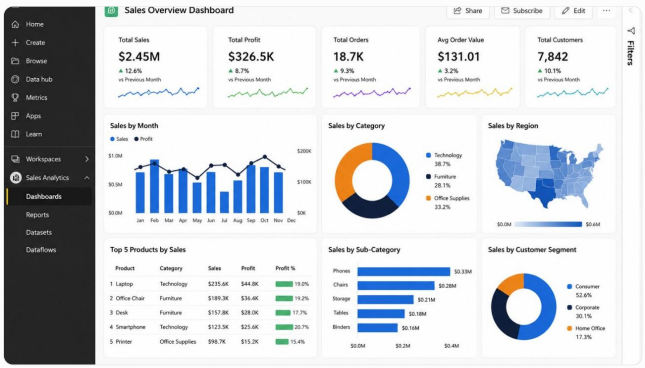
Microsoft Power BI is a business intelligence platform that enables organizations to
connect data sources, build interactive reports, and share business insights across teams.
Its integration with the Microsoft ecosystem makes it relevant for businesses already using
tools such as Excel, Azure, Microsoft Fabric, and Microsoft 365.
Key Features
- Interactive dashboards and customizable reports.
- Data transformation and modeling through Power Query and semantic models.
- DAX calculations for business metrics and advanced analysis.
- Integration with a broad range of databases, cloud services, and business
applications. - AI-assisted analytics capabilities, including natural-language experiences and
features available through Microsoft’s evolving Copilot ecosystem. - Row-level security and centralized report sharing through Power BI Service.
Best Use Cases
Power BI can support sales performance dashboards, financial reporting, retail analytics,
supply chain monitoring, customer analytics, and executive KPI reporting.
For example, a retail organization can combine sales, inventory, and store-level data to
monitor revenue, product performance, and stock availability through a unified dashboard.
Why businesses consider it: Power BI offers a flexible analytics environment for
organizations that need interactive reporting and integration with Microsoft technologies.
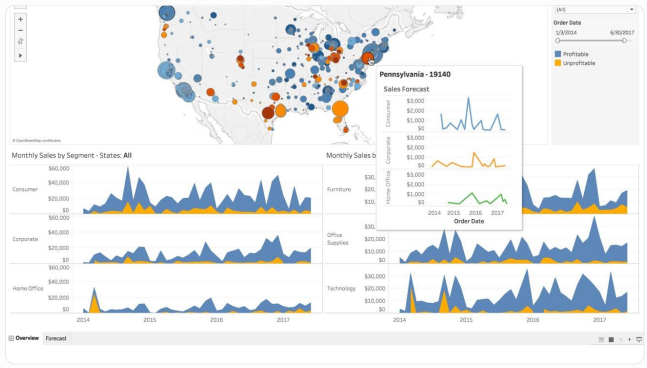
Tableau is a data visualization and analytics platform known for its interactive visual
exploration capabilities.
It enables analysts and business users to create dashboards that communicate complex
data through charts, maps, filters, and other visual elements.
Key Features
- Interactive dashboards and visual analytics.
- Drag-and-drop visualization development.
- Connections to databases, cloud platforms, and enterprise applications.
- Data exploration and visual storytelling.
- AI-assisted analytics capabilities through Tableau’s evolving AI features.
- Cloud and server deployment options.
Best Use Cases
Tableau can be used for executive reporting, customer analytics, financial analysis,
operational dashboards, and organizations with complex visual exploration requirements.
Why businesses consider it: It provides extensive visualization capabilities for teams
that need to explore and communicate complex datasets.
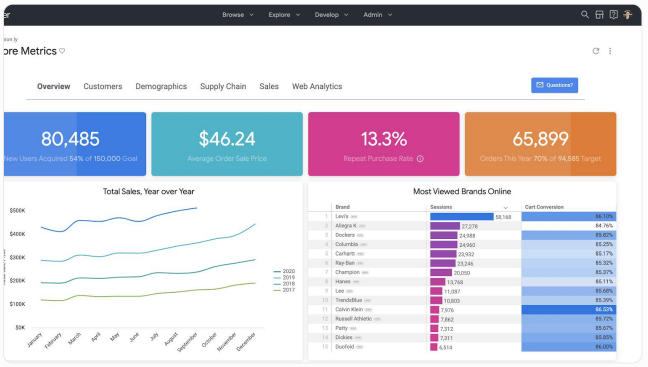
Looker is a business intelligence platform within Google Cloud that supports governed
data exploration, reporting, and embedded analytics.
Its modeling approach helps organizations define consistent business metrics and reuse
them across reports and applications.
Key Features
- Centralized business metric modeling through LookML.
- Interactive dashboards and data exploration.
- Integration with Google Cloud and BigQuery.
- Governed access to business data.
- Embedded analytics capabilities.
- Support for analytics experiences connected to enterprise data models.
Best Use Cases
Looker can support customer analytics, enterprise reporting, product analytics, and
organizations using Google Cloud data infrastructure.
Why businesses consider it: Its governed modeling approach can help organizations
maintain consistent metric definitions across teams.
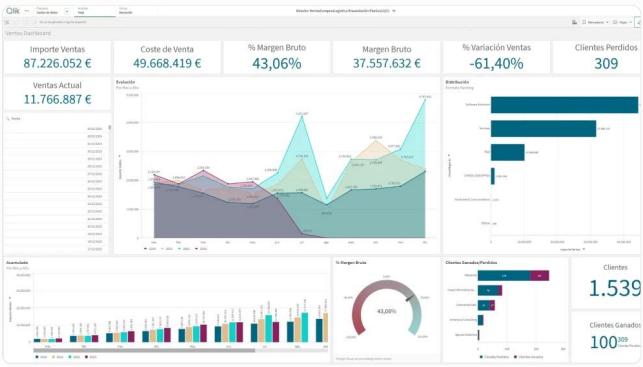
Qlik Sense is an analytics platform that combines interactive dashboards, data exploration,
and AI-assisted insight discovery.
Its associative analytics approach allows users to explore relationships between data
points and investigate connections across datasets.
Key Features
- Interactive dashboards and visual analytics.
- Associative data exploration.
- Data integration and analytics capabilities.
- AI-assisted insights and natural-language interaction features.
- Self-service analytics for business users.
- Enterprise analytics and governance capabilities.
Best Use Cases
Qlik Sense can support supply chain analytics, financial reporting, sales analysis,
operational monitoring, and cross-functional data exploration.
Why businesses consider it: Its associative exploration model can help users investigate
relationships that may not be obvious in predefined reports.
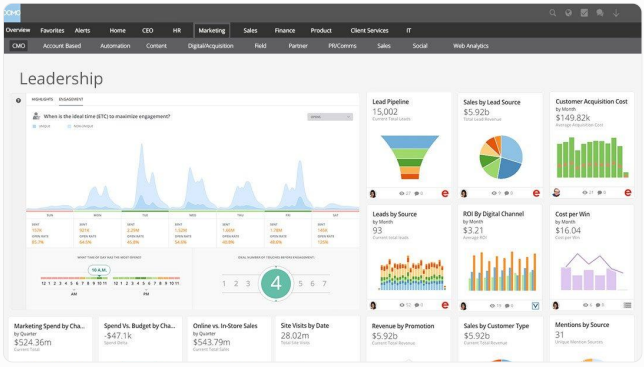
Domo is a cloud-based business intelligence platform that combines data integration,
visualization, reporting, and collaboration.
It provides a centralized environment for organizations that need to connect business data
and distribute analytics across teams.
Key Features
- Cloud-based dashboards and reporting.
- Data integration from business applications and databases.
- Interactive charts, KPIs, and visualizations.
- AI-assisted analytics and data exploration capabilities.
- Collaboration and sharing features.
- Data management and workflow capabilities.
Best Use Cases
Domo can be used for executive dashboards, sales performance monitoring, marketing
analytics, financial reporting, and multi-department business intelligence.
Why businesses consider it: Its integrated cloud analytics environment can help teams
bring reporting and data access together.
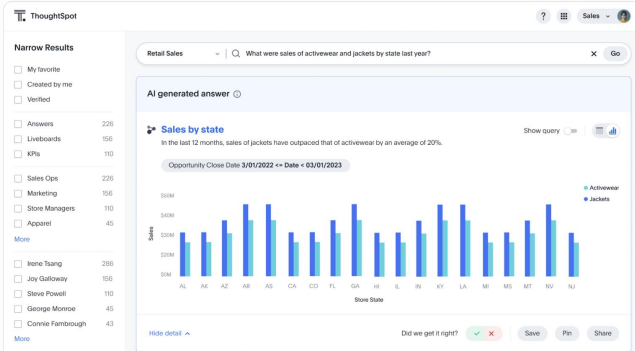
ThoughtSpot is an analytics platform designed around search-driven and AI-assisted data
exploration.
Instead of relying entirely on predefined dashboards, users can ask questions about
business data and explore visual answers.
Key Features
- Search-based data exploration.
- Natural-language analytics capabilities.
- Interactive visualizations and dashboards.
- AI-assisted insight discovery.
- Embedded analytics options.
- Enterprise data connectivity and governance features.
Best Use Cases
ThoughtSpot can support business teams that need self-service analytics, customer
insights, sales performance exploration, and conversational data analysis.
Why businesses consider it: Its search-oriented experience can help business users
investigate questions without creating every report from scratch.
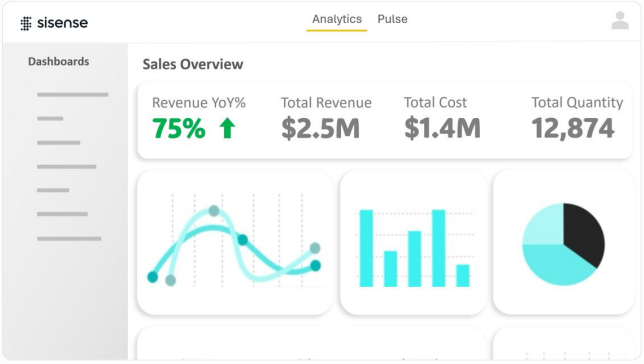
Sisense is an analytics platform focused on customizable dashboards and embedded
analytics.
It enables organizations to incorporate analytical experiences into applications, portals,
and business workflows.
Key Features
- Customizable dashboards and visualizations.
- Embedded analytics capabilities.
- APIs and developer-oriented integration options.
- Data connectivity and analytics modeling.
- Interactive reporting experiences.
- AI-related analytics capabilities, depending on the product configuration.
Best Use Cases
Sisense can be useful for SaaS companies, software product teams, customer-facing
analytics portals, and businesses that want to integrate dashboards directly into their
applications.
Why businesses consider it: It supports analytics experiences that can be integrated into
existing digital products and workflows.
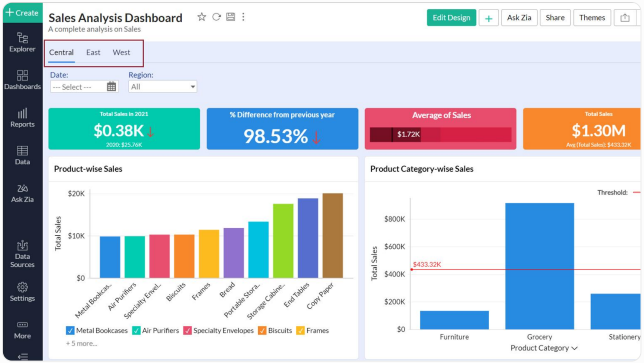
Zoho Analytics is a self-service business intelligence and data analytics platform that
enables organizations to build reports and dashboards using data from different sources.
Its AI-powered assistant, Zia, supports conversational analytics and automated insight
discovery.
Key Features
- Drag-and-drop report and dashboard creation.
- Data integration across business applications.
- AI-assisted analytics through Zia.
- Data visualization and interactive reporting.
- Automated insights and forecasting features.
- Sharing and collaboration capabilities.
Best Use Cases
Zoho Analytics can support sales reporting, financial dashboards, marketing analytics, and
businesses already using Zoho applications.
Why businesses consider it: It combines reporting, data visualization, and AI-assisted
analytics in a platform that can fit a range of business reporting requirements.
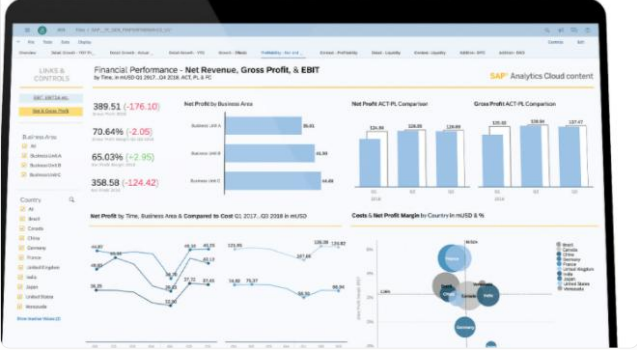
SAP Analytics Cloud is an enterprise analytics and planning platform designed to bring
business intelligence, financial planning, and forecasting capabilities into a unified
environment.
It is particularly relevant for organizations that rely on SAP business applications.
Key Features
- Interactive dashboards and business reporting.
- Planning and budgeting capabilities.
- Forecasting and predictive analytics features.
- Integration with SAP data environments.
- Enterprise reporting and data exploration.
- AI-assisted capabilities, depending on available features and configuration.
Best Use Cases
SAP Analytics Cloud can support financial planning, budgeting, enterprise performance
management, and analytics for organizations operating within the SAP ecosystem.
Why businesses consider it: It connects business intelligence with planning workflows,
particularly for SAP-oriented enterprises.
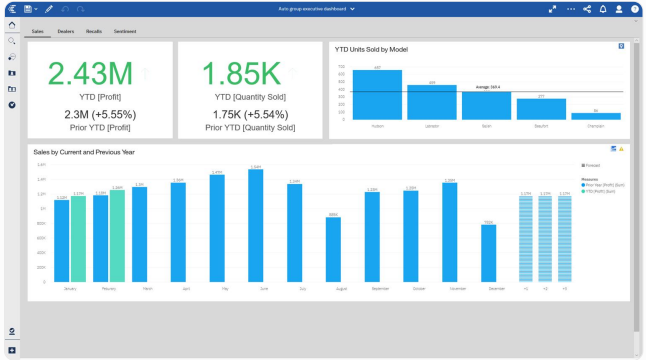
IBM Cognos Analytics is an enterprise business intelligence platform that supports
reporting, dashboards, data exploration, and AI-assisted analytics.
It can help organizations standardize reporting processes and provide controlled access to
business information.
Key Features
- Interactive dashboards and enterprise reporting.
- Data visualization and exploration.
- AI-assisted analytics capabilities.
- Reporting automation.
- Data governance and access controls.
- Integration with enterprise data environments.
Best Use Cases
IBM Cognos Analytics can support financial reporting, enterprise performance monitoring,
operational analytics, and organizations with established enterprise reporting
requirements.
Why businesses consider it: It offers enterprise reporting and analytics capabilities for
organizations that need structured reporting processes and governed data access.
How Niracore Helps Businesses Build Data-Driven Analytics Solutions
At Niracore, we help businesses transform fragmented data into structured, actionable
insights through business intelligence, data engineering, and analytics solutions.
Our focus is on building analytics systems that align with business objectives, improve
reporting efficiency, and support informed decision-making.
Our Data Analytics and BI Services
Power BI Dashboard Development
We design interactive Power BI dashboards and reports for sales,
finance, retail, operations, and executive performance monitoring
Data Engineering and ETL Solutions
We help businesses integrate data from multiple systems, build
reliable data pipelines, and prepare structured datasets for
analytics.
Microsoft Fabric and Cloud Analytics
We support modern analytics architectures using cloud data
platforms, centralized data environments, and scalable reporting
solutions.
AI and Analytics Automation
We help organizations explore AI-driven analytics and reporting
automation opportunities that reduce repetitive work and improve
access to business insights.
Our Approach to Analytics Projects
We follow a structured approach to help ensure that analytics solutions are reliable,
maintainable, and aligned with business requirements.
1. Requirement analysis: Understand business objectives, KPIs, users, and reporting
challenges.
2. Data assessment: Review source systems, data quality, and integration
requirements.
3. Solution architecture: Define the data model, analytics platform, and security
approach.
4. Dashboard development: Build interactive reports and dashboards around business
workflows.
5. Validation and deployment: Verify calculations, performance, and access controls
before release.
6. Ongoing optimization: Improve dashboards and data pipelines as business
requirements evolve.
Our goal is to help organizations establish a practical analytics foundation that supports
both current reporting needs and future growth.
FAQs
Popular enterprise dashboard platforms include Microsoft Power BI, Tableau, Google
Looker, Qlik Sense, Domo, ThoughtSpot, Sisense, Zoho Analytics, SAP Analytics Cloud,
and IBM Cognos Analytics. The right option depends on business requirements, data
infrastructure, security needs, and budget.
AI data visualization tools combine data visualization with AI-assisted capabilities such as
natural-language queries, automated insights, anomaly detection, and forecasting. These
features help users explore business data and identify patterns more efficiently.
A dashboard typically presents key metrics and visual summaries in an interactive
interface, while a BI report often provides more detailed analysis, structured tables, and
supporting information. Both can be used together to support business decision-making.
Yes. Power BI supports interactive dashboards, data modeling, reporting, data connectivity,
and enterprise access controls. Its integration with Microsoft technologies can make it
suitable for organizations using Microsoft-based data environments.
AI can assist with natural-language data exploration, anomaly detection, automated
summaries, forecasting, and some reporting tasks. Its effectiveness depends on data
quality, business context, and proper validation.
Evaluate your reporting objectives, data sources, user requirements, integration
capabilities, security, scalability, AI features, and total cost of ownership. A pilot project can
help validate the platform before wider deployment.
Yes. Many enterprise BI platforms connect to databases, ERP and CRM applications,
cloud services, spreadsheets, and APIs. The integration approach depends on the
platform, source systems, and data architecture.
Niracore provides business intelligence, Power BI dashboard development, data
engineering, cloud analytics, and reporting automation services to help organizations
transform business data into actionable insights.