
Businesses today rely on multiple software applications to manage everything from customer
relationships and financial operations to inventory, sales, and reporting. However, when these applications operate independently, employees often spend valuable time transferring information, updating records, and performing repetitive tasks manually.
Automation helps businesses reduce this operational burden, improve efficiency, and connect their technology ecosystems.
Two widely used approaches to business automation are Robotic Process Automation (RPA) and API integration. Although both can reduce manual work and improve productivity, they solve different types of problems.
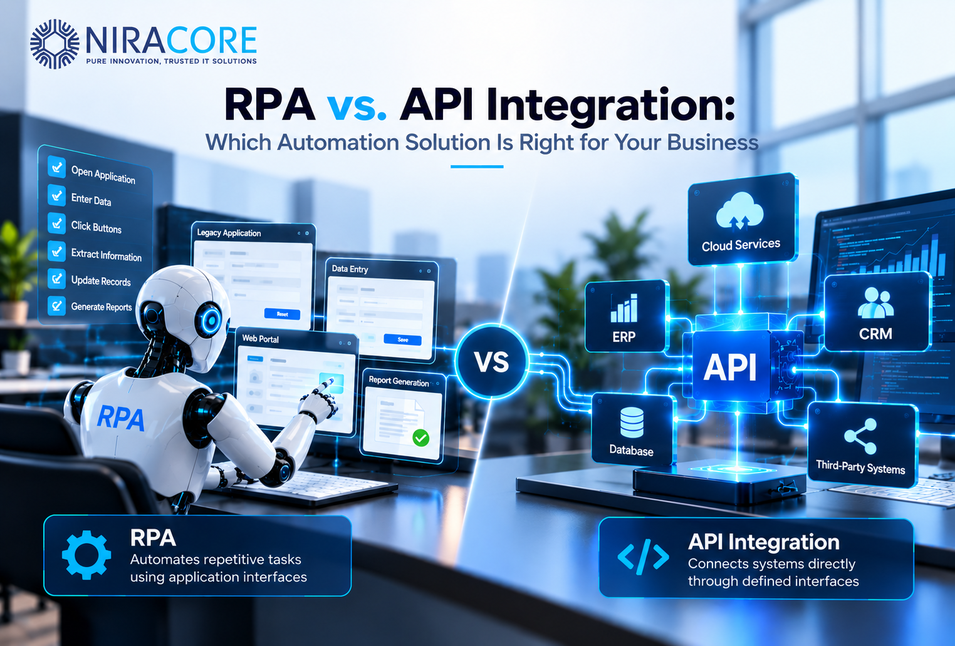
RPA automates tasks by interacting with application interfaces, while API integration enables software systems to communicate directly through defined interfaces.
Understanding the differences between RPA and API integration can help organizations choose an approach that fits their existing infrastructure, operational requirements, and long-term technology goals.
What Is Robotic Process Automation (RPA)?
Robotic Process Automation (RPA) is a technology that uses software bots to perform repetitive, rulebased tasks by interacting with applications through their user interfaces.
Instead of requiring a person to open an application, enter information, click buttons, and move data between systems, an RPA bot can perform these activities automatically by following predefined instructions.
For example, a bot can log in to a financial portal, download an invoice, extract relevant information, update an accounting application, and generate a confirmation report.
RPA is particularly useful when organizations need to automate workflows involving legacy applications or third-party platforms that do not provide suitable APIs.
How Does RPA Work?
A typical RPA workflow follows a series of predefined steps:
1. Trigger the process: A scheduled event, incoming file, or business action initiates the workflow.
2. Access the application: The bot opens the required application and authenticates.
3. Perform tasks: It navigates screens, enters information, retrieves data, or submits forms.
4. Validate the results: The bot checks whether the expected actions were completed successfully.
5. Record the outcome: The process logs its execution status and routes exceptions for review.
Modern RPA platforms may also incorporate optical character recognition (OCR), document processing, and AI capabilities to handle less structured information.
Common RPA Use Cases
Businesses commonly use RPA for:
• Invoice processing and data entry.
• Extracting information from documents and web portals.
• Updating customer records across applications.
• Generating scheduled reports.
• Processing repetitive back-office workflows.
• Automating tasks in legacy systems without accessible APIs.
Benefits of RPA
RPA can help organizations reduce repetitive manual work, improve consistency, accelerate routine processes, and make better use of existing software investments.
It can also provide a practical automation option when replacing a legacy application or developing a custom integration is not immediately feasible.
However, RPA depends on the stability of the application interface and the reliability of the workflow. Changes to screen layouts, authentication methods, or application behavior may require bot maintenance.
What Is API Integration?
API integration is the process of connecting software applications through Application Programming Interfaces (APIs), allowing them to exchange information and trigger actions programmatically.
An API defines how one application can request data or functionality from another application. Instead of interacting with a graphical interface, the integration communicates directly with the system through supported endpoints and data formats.
For example, when a customer places an order on an e-commerce website, an API integration can send the order details to an inventory management system, update stock information, and initiate fulfillment.
This communication can happen automatically, without an employee manually transferring information between applications.
How Does API Integration Work?
A typical API integration involves the following steps:
1. Establish a connection: The integration connects to the target system using its API endpoint.
2. Authenticate the request: Credentials, API keys, or OAuth-based authentication establish authorized access.
3. Send structured data: The source system sends a request containing the required information.
4. Process the request: The receiving application validates and processes the data.
5. Return a response: The system provides a response indicating success, failure, or the requested information.
6. Handle errors and retries: The integration manages failed requests, timeouts, and other exceptions according to predefined rules.
Depending on the architecture, API integrations may use REST, SOAP, GraphQL, webhooks, or messaging-based communication.
Common API Integration Use Cases
API integration is widely used for:
• Synchronizing customer data between CRM and ERP platforms.
• Connecting e-commerce websites with payment gateways.
• Integrating accounting and billing systems.
• Connecting SaaS applications and cloud platforms.
• Automating order processing and inventory updates.
• Integrating business applications with analytics and reporting platforms.
Benefits of API Integration
API integration enables structured data exchange, supports scalable system connectivity, and reduces dependence on manual processes.
It can also improve the reliability of data synchronization and support real-time or near-real-time workflows when the connected systems provide suitable APIs and event-driven capabilities.
However, successful API integration requires appropriate authentication, data mapping, error handling, monitoring, and ongoing maintenance.
RPA vs. API Integration: Key Differences
One common misconception is that AI automation means removing people from the process. In practice, the strongest implementations often automate repetitive steps while keeping people at important decision points.
Another misconception is that AI alone will fix a broken process. It usually will not. If data is inconsistent, responsibilities are unclear, or business rules are poorly defined, adding AI can make the process harder to manage. Workflow design, data quality, governance, and ownership remain important.
A third misconception is that a successful pilot automatically produces ROI. A workflow can run correctly and still deliver little business value if it saves only a few minutes, is rarely used, or costs more to maintain than the value it creates.
The better approach is to measure the baseline first, define success metrics, and then automate processes where the business impact is clear.
Business Opportunities and Challenges
Although RPA and API integration both support automation, their technical approaches and ideal applications differ.
The most important distinction is that RPA automates interactions with applications, while API integration connects applications directly through their supported interfaces.
| Comparison Factor | RPA | API Integration |
|---|---|---|
| Interaction method | User interface and application screens | Programmatic communication through APIs |
| Primary purpose | Automating repetitive tasks | Connecting software systems |
| Best suited for | Legacy applications and screen-based workflows | Modern applications with accessible APIs |
| Implementation | Often uses visual workflow designers | Usually requires integration development or middleware |
| Processing speed | Depends on screen navigation and execution | Often faster for structured data exchange |
| Scalability | Depends on bot infrastructure and licensing | Depends on API limits and integration architecture |
| Maintenance | Sensitive to UI and workflow changes | Sensitive to API changes and system contracts |
| Data handling | Can process information through screens and documents | Primarily exchanges structured data |
| Error handling | Requires bot-level validation and exception management | Uses response codes, retries, and integration-level controls |
| Common applications | Data entry, portal automation, repetitive tasks | System connectivity, data synchronization, application integration |
Key takeaway: RPA is useful when automation must operate through an application’s interface. API integration is suitable when systems can communicate directly through supported interfaces.
Neither approach is universally appropriate for every business process.
RPA vs. API Integration: Practical Business Use Cases
The right automation strategy depends on the systems involved, the nature of the workflow, and the expected business outcome.
Let’s explore how both approaches can support common business scenarios.
1. Finance and Accounting Automation
Finance teams often handle repetitive activities such as invoice entry, payment reconciliation, and updating financial records.
RPA approach: A bot can retrieve invoices from a supplier portal, extract relevant information, and enter the details into an accounting application that lacks suitable integration capabilities.
API approach: An API integration can transfer invoice data between an ERP system and accounting software, synchronize payment status, and exchange transaction details.
Business impact: Both approaches can reduce manual data entry and improve processing consistency. The appropriate choice depends on whether the systems expose suitable APIs and how much of the workflow involves document or screen-based tasks.
2. Customer Relationship Management (CRM)
Sales and customer service teams frequently work with CRM platforms, marketing applications, support systems, and customer databases.
RPA approach: A bot can update customer information in a portal when no suitable integration interface is available.
API approach: APIs can synchronize customer records, transfer lead information, and connect CRM systems with marketing automation or customer support platforms.
Business impact: Connected customer data can improve visibility across departments, reduce duplicate data entry, and support more consistent customer interactions.
3. Supply Chain and Inventory Management
Supply chain operations depend on accurate inventory data, order information, shipment updates, and supplier communication.
RPA approach: Bots can retrieve stock information from supplier portals, update legacy systems, and automate repetitive administrative tasks.
API approach: APIs can connect inventory platforms with e-commerce applications, warehouse management systems, and order processing software.
Business impact: Automation can improve data visibility, reduce manual coordination, and support more efficient order fulfillment.
4. Healthcare Administration
Healthcare organizations manage patient information, appointments, billing, claims, and administrative workflows across multiple systems.
RPA approach: Bots can automate repetitive data entry and administrative tasks in systems where suitable integration options are unavailable.
API approach: APIs can connect compatible healthcare applications for authorized data exchange, subject to applicable privacy, security, and interoperability requirements.
Business impact: Both approaches can reduce administrative effort and improve information flow when implemented with appropriate access controls and validation.
5. Business Intelligence and Reporting
Organizations depend on timely and accurate information to monitor business performance and make operational decisions.
RPA approach: A bot can log in to a reporting portal, download scheduled reports, and place the files in a designated location for further processing.
API approach: APIs can retrieve structured data from business applications and deliver it to data pipelines, analytics platforms, and reporting systems.
Business impact: Integrating business applications with analytics platforms can reduce manual reporting activities and improve the availability of business data.
For organizations using Power BI, Microsoft Fabric, or cloud-based data platforms, API-driven data access can be an important part of a scalable reporting architecture.
Example: Automating a Legacy ERP Workflow
Imagine a company using an older ERP application that does not expose APIs for updating supplier records.
Employees currently log in, search for supplier details, and manually update information.
An RPA bot can automate these steps through the application’s interface, reducing repetitive effort without requiring a complete ERP replacement.
However, the company should account for bot maintenance, exception handling, and security requirements.
When Should You Choose API Integration?
API integration is generally suitable when applications expose the necessary functionality through supported APIs and the business needs reliable, structured communication between systems.
Consider API integration when:
• You need to synchronize data across multiple applications.
• Your business requires frequent or near-real-time updates.
• You are building a connected software ecosystem.
• You need to process a large volume of structured transactions.
• You want to reduce manual data transfers between systems.
• Your organization is developing a custom application that connects with third-party services.
Example: Connecting an E-Commerce Platform With an ERP
Consider an online retailer that receives hundreds or thousands of orders daily.
An API integration can transfer order information from the e-commerce platform to the ERP system, retrieve inventory information, and synchronize fulfillment status.
With appropriate architecture, monitoring, and error handling, the integration can support efficient data exchange as transaction volumes increase.
Can RPA and API Integration Work Together?
Consider an online retailer that receives hundreds or thousands of orders daily.
An API integration can transfer order information from the e-commerce platform to the ERP system, retrieve inventory information, and synchronize fulfillment status.
With appropriate architecture, monitoring, and error handling, the integration can support efficient data exchange as transaction volumes increase.
Can RPA and API Integration Work Together?
Yes. In many business environments, combining RPA and API integration can provide a practical way to automate end-to-end workflows.
Organizations often operate a mixture of modern cloud applications, older enterprise systems, thirdparty portals, and custom software. Not every application supports the same integration capabilities.
A hybrid automation strategy allows businesses to use APIs where direct system connectivity is available and RPA where interface-based interaction is necessary.
Example: End-to-End Order Processing
Consider a distribution company that receives customer orders through an online platform and manages fulfillment through a combination of modern and legacy systems.
A hybrid workflow could operate as follows:
1. An API integration transfers order information from the online platform to the central order management system.
2. The system validates the order and updates inventory through available APIs.
3. An RPA bot enters the required information into a legacy supplier portal that does not offer a suitable API.
4. The bot retrieves the supplier’s confirmation and passes the result to the central workflow.
5. APIs synchronize the order status with the relevant business applications.
6. Monitoring and exception handling identify failed transactions for review.
This approach allows each technology to perform the tasks for which it is suited.
The objective is not to use more automation tools. It is to create a connected workflow that is reliable, maintainable, and aligned with business requirements.
RPA vs. API Integration: Cost and Return on Investment
Cost is an important consideration when evaluating automation technologies. However, comparing only the initial implementation cost can lead to incomplete decisions.
Businesses should consider the total cost of ownership over the expected life of the solution.
RPA Cost Considerations
RPA implementation costs may include:
• Software licensing and bot execution fees.
• Initial process analysis and bot development.
• Virtual machines or execution infrastructure.
• Monitoring and exception management.
• Maintenance when application interfaces change.
• Security, access management, and operational support.
RPA can offer a relatively quick path to automating suitable processes, but the long-term cost depends on the number of bots, workflow complexity, and maintenance requirements.
API Integration Cost Considerations
API integration costs may include:
• Integration design and development.
• Authentication and security implementation.
• Middleware or integration platform licensing.
• Data transformation and validation.
• Monitoring, logging, and error handling.
• Ongoing maintenance as APIs and business requirements evolve.
Although API integration may require more technical planning upfront, reusable integrations can support multiple business processes and reduce manual coordination over time.
How to Evaluate ROI
Organizations can assess automation ROI by comparing the cost of implementing and maintaining a solution against measurable business outcomes.
Useful metrics include:
| KPI | What It Measures |
|---|---|
| Processing time | Time required to complete a workflow |
| Cost per transaction | Operational cost of processing each transaction |
| Error rate | Frequency of incorrect or incomplete transactions |
| Automation rate | Percentage of tasks completed without manual intervention |
| Maintenance effort | Time and resources required to keep automation operational |
| Exception rate | Percentage of transactions requiring human intervention |
4. Design for Security and Compliance
Use appropriate authentication, role-based access controls, secure credential storage, and audit logging.
Ensure that automation workflows follow applicable data protection and industry requirements.
5. Implement Error Handling and Monitoring
Automation should include mechanisms for detecting failures, retrying appropriate operations, logging exceptions, and escalating issues for human review.
Monitoring helps teams identify problems before they significantly affect business operations.
6. Plan for Scalability and Maintenance
Consider expected transaction volumes, system changes, infrastructure requirements, and support responsibilities.
For APIs, account for rate limits and version changes. For RPA, plan for interface changes and bot execution reliability.
7. Measure Business Outcomes
Define success metrics before deployment and review performance after implementation.
Use measurable results to identify opportunities for improvement and determine whether the automation should be expanded.
How Niracore Helps Businesses With Automation and Integration
At Niracore, we help businesses improve operational efficiency through technology solutions that connect systems, automate workflows, and support data-driven decision-making.
Our approach focuses on understanding existing business processes, evaluating technology options, and designing solutions that align with operational requirements.
Our capabilities include:
API Integration and Custom Software Development
We help businesses connect applications, automate data exchange, and develop custom software solutions that support their integration requirements.
Business Process Automation
We help identify repetitive workflows and evaluate opportunities to reduce manual effort through automation technologies and process improvements.
Data Engineering and Business Intelligence
We support data integration, transformation, and reporting initiatives that help organizations consolidate business information and improve operational visibility.
Cloud and Enterprise Integration
We help organizations connect business applications and cloud-based platforms while considering scalability, security, and long-term maintainability.
Automation Strategy and Consulting
We work with businesses to assess existing systems, identify automation opportunities, and develop implementation strategies based on business priorities.
Whether your organization is modernizing legacy applications, integrating cloud platforms, or improving reporting workflows, Niracore can help you explore an approach that fits your technology environment.
Conclusion: Choosing the Right Automation Approach
RPA and API integration both play important roles in business automation, but they address different technical requirements.
RPA is useful for automating repetitive tasks through application interfaces, particularly when working with legacy systems or applications that lack suitable integration options.
API integration enables direct communication between software systems, making it suitable for structured data exchange, application connectivity, and scalable workflows.
For many organizations, a hybrid approach can provide a practical balance between modern integration capabilities and the realities of existing business systems.
The right decision begins with understanding your processes, evaluating available integration options, and defining measurable business objectives.
By choosing an automation strategy that aligns with your operational needs, your organization can reduce manual work, improve data consistency, and build a more connected technology environment.
Looking to automate your business processes or integrate your existing applications?
Connect with Niracore to explore API integration, business process automation, custom software development, and data solutions tailored to your business requirements.
Website: https://niracore.com
FAQs
RPA automates tasks by interacting with application interfaces, such as buttons, forms, and screens. API integration connects software systems directly through defined interfaces, enabling structured data exchange and application-to-application communication.
Neither technology is universally better. RPA can be useful for automating legacy systems and repetitive screen-based tasks, while API integration is often suitable for connecting applications and synchronizing structured data. The right choice depends on the process and available system capabilities.
Yes. RPA can automate tasks through an application’s user interface even when the application does not provide a suitable API. However, the automation depends on the stability of the interface and may require maintenance when the application changes.
API integration can support real-time or near-real-time workflows when the connected applications provide suitable APIs, webhooks, or event-driven capabilities. Actual performance depends on system design, processing constraints, and network conditions.
Yes. Businesses can use APIs for direct system communication and RPA for tasks that require interaction with legacy applications or third-party portals. A hybrid approach can help automate workflows across different technology environments.
The total cost depends on implementation complexity, licensing, transaction volume, infrastructure, and ongoing maintenance. RPA may offer a practical option for certain short-term or interface-based tasks, while API integration may provide long-term value for recurring system connectivity.
Start by evaluating the workflow, identifying available APIs, understanding transaction volumes, assessing security requirements, and estimating total ownership costs. A small pilot project can help validate the approach before broader implementation.